Music Memos alternative
The Music Memos alternative for songwriters.
Apple stopped new downloads of Music Memos on 1 March 2021 and has not updated it since. Music Dawn records an idea in one tap and plays it back mixed, with a tuner, a click and your lyrics kept next to the take.
Free on iPhone, iPad and Apple Watch. Your old Music Memos ideas can come along.



01 / What happened
What happened to Music Memos.
- 20 Jan 2016
- Apple releases Music Memos, a free app for iPhone and iPad made for songwriters. It records guitar or piano, shows the chords and can add drums and a bass line that follow your playing.
- 1 Mar 2021
- New downloads stop and the updates end. Apple's guide points to Voice Memos for recording, and to GarageBand for turning ideas into songs.
- Today
- If you downloaded it before, Apple's guide says you can still reinstall it from your App Store purchase history. When it opens, it offers to export your ideas to Voice Memos, where they land in a folder called Music Memos.
“The Music Memos app is no longer being updated, and will no longer be available for new users to download as of March 1, 2021.”
“Recording is moving to Voice Memos.”
“You can also send your ideas from Music Memos to GarageBand for use in your GarageBand songs.”
02 / What it did
What Music Memos did that Voice Memos does not.
Apple called Music Memos “inspired by Voice Memos” and added tools for songwriting. Voice Memos still records, trims, sorts into folders and syncs through iCloud. These are the parts it never took over.
- It started recording by itself when it heard a guitar or piano, and stopped a few seconds after you did.
- A guitar tuner sat on the recording screen.
- It showed the chords you played, and you could correct them.
- It added drums and a bass line that followed the rhythm and harmony of your idea.
- Each idea sat over bar lines, with a time signature you could change.
- Every idea could carry a text note, a capo position and a guitar tuning.
- You rated ideas with stars and tagged them by song part or feel.
03 / In Music Dawn
How Music Dawn covers what Music Memos did.
Record in one tap
From the app, the Lock Screen, Control Center, Siri, Shortcuts or Apple Watch. With Catch Early Start, the default, recording begins the moment the record screen opens. Music Dawn does not start by itself when it hears music.
Hear the take mixed
Every take plays through EQ, a compressor, a plate reverb and Master, so a phone recording sounds full the moment you stop. The recorded file never changes. Pro adds the other 12 effects, such as delay, chorus and tape, and your own chains.
See the chords and key
Chord and key detection (Beta, Pro) writes the chords under the waveform and shows the key and tempo when it is confident. Tap a chord to jump to it. A detected chord cannot be edited; type your own in the notes.
Tune
The tuner is one tap from the library: note, frequency and cents, with guitar strings as targets and A4 at 432, 440 or 442 Hz.
Play to a click
A metronome in your headphones from 40 to 240 BPM, in 2/4 up to 7/4, with tap tempo. The click never ends up in the take. There is no drum or bass accompaniment.
Keep the lyrics with the take
Every recording has notes for lyrics, chords, a capo position or the gear you used, and search finds words in them. With Pro, a time at the start of a line plays the take from there.
Sort ideas by song
Give each song a folder, keep the best takes in Favorites, search by title, or browse by where you recorded. There are no star ratings or tags.
The same library on iPhone and iPad
Your own private iCloud keeps both in step, and takes from Apple Watch arrive on your iPhone. There is no Mac app.
Take it to GarageBand or your DAW
Share a take as a 24-bit WAV with the sound you hear, or share the original file, through AirDrop, Mail or Save to Files.
Bring old recordings in
From Voice Memos through the share sheet, or from Files with Import Audio. Music Dawn copies them and leaves the originals where they are.
Tuner and click
Tune up, then play to a click.
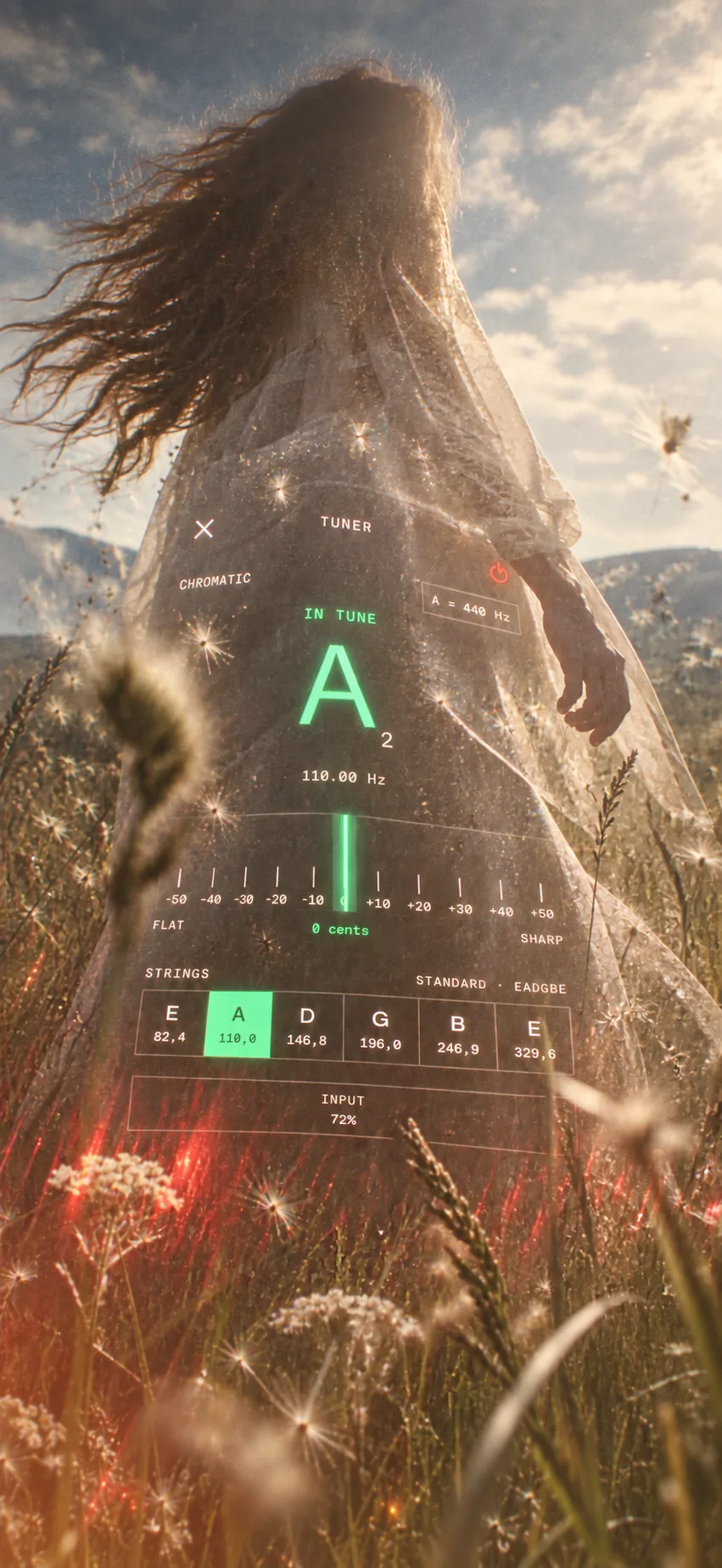
The tuner Music Memos had.
Note, frequency and cents, with guitar strings as targets. A4 at 432, 440 or 442 Hz.
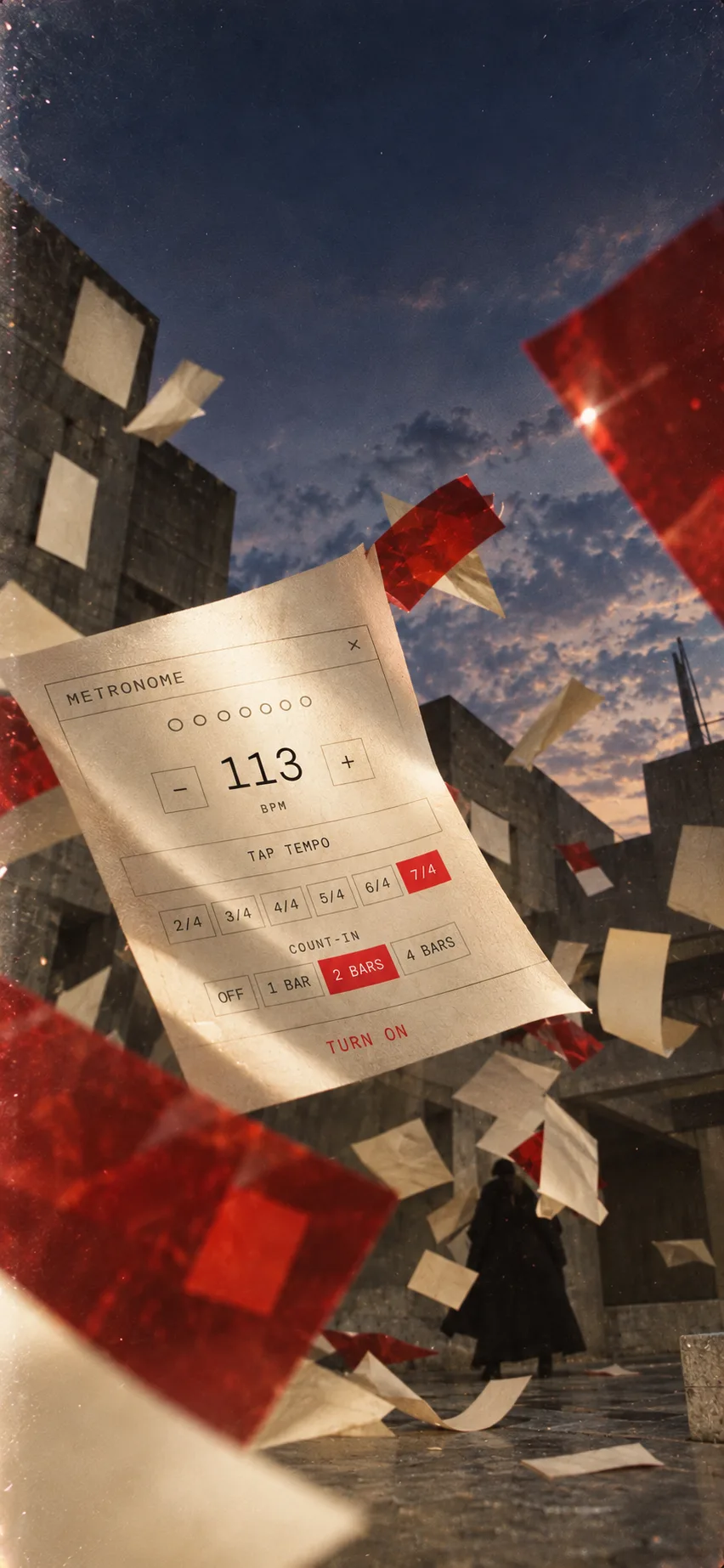
The click it never had.
40 to 240 BPM, 2/4 up to 7/4, or tap the tempo. In your headphones, never in the take.
04 / Side by side
Music Memos, Voice Memos and Music Dawn, side by side.
| Feature | Music Memos | Voice Memos | Music Dawn |
|---|---|---|---|
| New downloads and updates | No, since 1 March 2021 | Yes, built into iOS | Yes |
| Record in one tap | Yes | Yes | Yes |
| Starts recording by itself when you play | Yes, guitar or piano | No | No |
| Guitar tuner | Yes | No | Yes |
| Click in your headphones | No | No | Yes |
| Drums and bass that follow your playing | Yes | No | No |
| Chord names on a take | Yes, editable | No | Pro (Beta) |
| Bar lines or tempo | Bar lines and time signature | No | Tempo, Pro (Beta) |
| Effects on playback | No | Enhance Recording (noise and echo) | EQ, compressor, plate reverb and Master; 12 more with Pro |
| Notes on a take | Text, capo and tuning | No | Lyrics, chords, capo, gear |
| Sorting ideas | Star ratings and tags | Folders and favorites | Folders, favorites and places |
| Library on iPhone and iPad through iCloud | Yes | Yes | Yes |
| Export | Mixdown, audio file or GarageBand project | M4A, or editable with layers | 24-bit WAV with your sound, or the original |
| Transcribe speech | No | Yes | No |
| Mac app | No | Yes | No |
Music Dawn does not start recording by itself, add drums and bass, let you edit a detected chord, or rate and tag ideas, and it has no Mac app. Chord, key and tempo detection, times in notes, headphone monitoring and the other 12 effects need Pro.
Checked against Apple's Music Memos guide and the iOS 26 Voice Memos guide, October 2026.
05 / Bring them across
Bring your Music Memos ideas across.
Through Voice Memos
- Open Music Memos and tap Export when it offers to send your ideas to Voice Memos. If you exported them before, they are already there.
- In Voice Memos, open the Music Memos folder, tap Select, choose the recordings and tap Share. Pick Music Dawn.
- Check the count and tap Add, then open Music Dawn. The recordings are in the Imported folder, with their names.
Through Files
- In Music Memos, tap an idea, tap Share, then Save to Files. Choose the audio file option, then iCloud Drive and a folder.
- In Music Dawn, tap Import Audio in the library (on iPad, in the sidebar) and select the files. You can pick several at once.
- They go into the folder you have open, or into Imported.
Music Dawn copies the audio and its name. Ratings, tags and chords stay in Music Memos, and a shared file can carry the date it was shared instead of the day you recorded it.
Questions
Before you move your ideas.
- Is it free?
- Yes. Recording, the library, iCloud sync, the tuner, the metronome, playback, trimming, and the finished sound (EQ, a compressor, a plate reverb, and Master) are free. Music Dawn Pro adds live monitoring, every other effect, your own effect chains and presets, and chord, key, and tempo detection (Beta). Pro is monthly, yearly with a 7-day free trial, or a one-time purchase.
- Does it work offline?
- Yes. Recording, the tuner, the metronome, playback, effects and chord detection all run on your device without a connection. Syncing between iPhone and iPad needs one.
- Where are my recordings?
- In Music Dawn's library on your device, synced through your own private iCloud between iPhone and iPad. They are not a folder in the Files app. To get a file out, open the take, tap More and choose Share, then Save to Files. There is no account, and Beyond Beyond never receives your recordings.
- Can Music Dawn add drums and bass like Music Memos?
- No. Music Dawn plays a click in your headphones while you record. Share the take as a WAV and open it in GarageBand to add a drummer and a bass part there.
- Can I still use Music Memos?
- If you downloaded it before 1 March 2021, Apple's guide says you can reinstall it from your App Store purchase history. It gets no updates, and the guide names iOS 14 and iPadOS 14 as the versions it runs on.